





Integrations and claims
How Orbital Atlas works with Create, Create Aeronautics, Sable, FTB Chunks, Open Parties and Claims, FTB Teams, Waystones, Xaero's Minimap and JourneyMap.
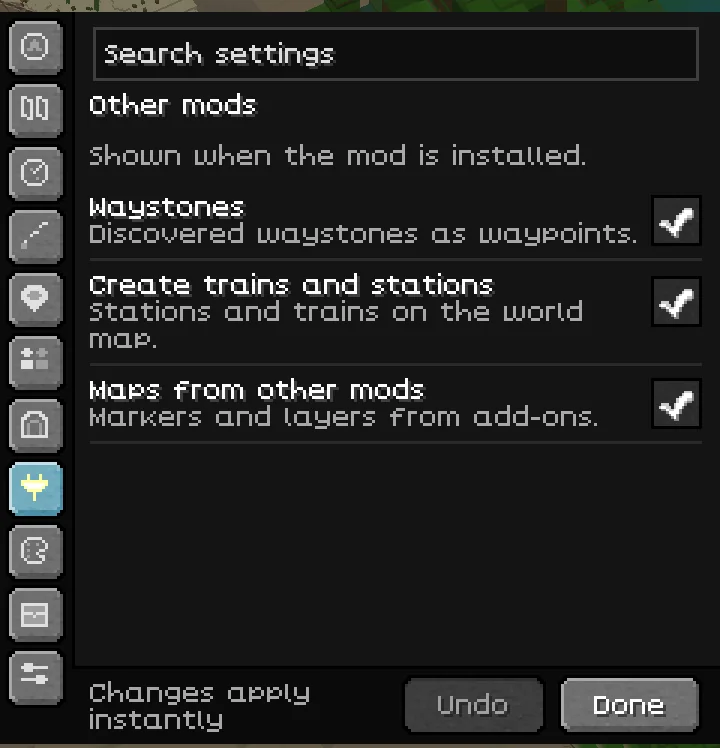
Orbital Atlas works with Create, Create Aeronautics, Sable, FTB Chunks, Open Parties and Claims, FTB Teams and Waystones, and imports waypoints from Xaero's Minimap and JourneyMap. None of them is required: each integration switches itself on when its mod is installed, and its settings appear in the Other mods group of the settings drawer only then.
Create, Create Aeronautics and Sable#
With Create installed, the world map draws train tracks and stations (Train lines in Overlays) and the trains running on them (Trains), on by default. Create trains and stations in Settings switches the integration as a whole. To show trains, Atlas asks Create for train positions through Create's own train map request: a few times a second while the world map is open, and briefly every five seconds for the minimap. A server's fair-play rules can turn train lines or trains off.
Moving builds, such as Create contraptions, Create Aeronautics airships and Sable ships, are drawn on both maps from their own blocks while they move (Moving builds in Overlays). When you ride one, its own roof does not count as cover, so the map keeps the outside view of your journey; a tunnel or hangar around it still does.
FTB Teams#
On a server with the Atlas server add-on, your team is your FTB Teams party when FTB Teams is installed, and otherwise your vanilla scoreboard team. Pings, team marks, shared routes, region names and far teammates' positions go to that team.
Waystones#
The waystones you have activated appear on the maps as waypoints (Waystones in Settings and Overlays). They are read from the world you are in and never carried into another world.
Waypoint imports#
Import waypoints in the settings drawer, or /atlas import, reads the waypoint files that Xaero's Minimap and JourneyMap keep in your instance folder. You get a preview, nothing changes until you press Import, and Undo takes it back. The other mods' files are not changed. Imports can be switched off with Waypoint imports.
Claims: FTB Chunks and Open Parties and Claims#
Orbital Atlas shows and edits claims from FTB Chunks or Open Parties and Claims. The claim tools appear only when a supported claim mod is ready in the current world or server. Atlas sends requests to the claim mod, and that mod keeps control of ownership, permissions, distance, dimensions, claim limits and force-loading limits.
Read the overlay#
Claimed land is drawn in its owner's colour, with one border and one name for each claimed area. Hover a claim to see its owner, your relationship to it, and whether it is force-loaded. FTB Chunks claims and Open Parties claims in Settings, and Claims in Overlays, switch the overlay.
Claim style offers Border (the default), Frontier, Banner and Hatched. Claim border width changes the border lines on both maps, from 50% to 200%. On the tilted world map, borders hide behind hills like the land itself.
An Ally tag marks an FTB team that ranks you as an ally. It describes your relationship to that owner and gives you no extra claim actions. Open Parties party membership shows as your party.
Claim mode#
Open the world map and press C, or choose Claims. The claim panel shows the active claim mod, the chunk under the pointer, your claimed and force-loaded totals, and the limits when the mod supplies them.
| Input in claim mode | Request |
|---|---|
| Left-click a chunk | Claim it. |
| Right-click a chunk | Unclaim it. |
| Left drag | Claim the selected area. |
| Right drag | Unclaim the selected area. |
| Shift + left-click or drag | Force-load the selected claims. |
| Shift + right-click or drag | Stop force-loading the selection. |
| Middle drag, Space + left drag or Alt + left drag | Pan the map. |
| Scroll | Zoom. |
| Tab | Switch claim mod, when both are ready. |
| Esc, C or Claims | Leave claim mode. |
A drag sends its request when you release the button. Shift + left-click on a single force-loaded chunk stops force-loading it. Read the panel's answer before you make another request.
Limits and refused requests#
For FTB Chunks, Atlas follows the reach of FTB Chunks' own claim screen: seven chunks from your chunk in each direction. A larger selection is clipped, and a notice says how many chunks were skipped. Open Parties and Claims checks its own distance.
Waiting for means the previous request has not been answered yet. Limits unknown means the claim mod has not supplied totals; it does not mean claims are unlimited.
Atlas does not send Open Parties claim edits while its admin, moderator, server-claim or impersonation mode is on. Go back to the ordinary player mode in Open Parties first.
If the Claims button is missing, check that the claim mod is installed and active in that world. Atlas does not add a claim system to a server by itself.
Other map mods and add-ons#
Other map mods can stay installed next to Atlas. Give the maps different keys and, if you like, hide one minimap. Add-ons can put their own markers and layers on the Atlas maps; Maps from other mods switches them, and each add-on layer gets its own switch named by its add-on.